Telstra NTD
(Network Termination Device)
What is a Telstra NTD?
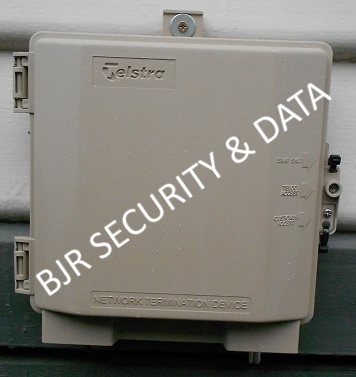
A Telstra NTD (Network Termination Device) is device that can be
installed to single dwellings or, in some cases, small business and terminates Telstras lead in phone cable and becomes a defined network boundary point.
Customer cabling is then connected to the NTD. The NTD also provides a testing point for the customer, Telstra or cabler.
The NTD is housed in a light brown enclosure marked 'Telstra' and 'Network Termination Device'.
Cabling is connected to a 'line module', Telstras lead in cable is connected onto one side, customer cabling is connected onto the other. The module has a Test socket, in witch the customer can access, connect a phone and check the line, by plugging in a phone, it disconnects ALL cabling, filters and devices within the house and connects straight onto Telstras lead in cable, this can be very useful in fault finding, the client will know if the fault is on Telstras site or there side, and can contact Telstra or a registered cabler as appropriate to fix, without calling Telstra to fix, only to be invoiced for incorrect call out because the fault lies within cabling beyond the network boundary. The module may include a DSL central filter
if required, or a separate filter may be mounted inside the enclosure.
Advantages of a NTD
Clear defined Telstra network boundary
Client accessible test socket that connects direct onto incoming line
External mounted ADSL central filter
Surge and lightning protection (optional) when connected to earth stake
A NTD becomes the new defined network boundary, and makes fault finding much easier for the customer, cablers or Telstra in determining if the fault lies within Telstras side, or the cabling and or equipment in the premises.
If you have ADSL, we would install a line module with built in central filter inside the NTD, this will filter ALL cabling through the premises, except the cable or pair going to the modem. See the main FAQ page for info on how this can help ADSL speed.
The NTD has inbuilt surge and lightning protection when connected to a suitable earth bonding conductor, if the NTD is installed near the main earth stake we can connect it to take advantage of the surge and lightning protection.
Who installs the NTD?
For a new house that Telstra is connecting to for the first time, Telstra may, if requested, supply and install a NTD, providing the customer cabling has been pre wired from the NTD location to outlets inside at no cost to Telstra, the NTD location is approved by Telstra and Telstra are given prior notification of the requirement to install a NTD.
For new installations, the NTD can also be installed by a registered cabler authorised by Telstra, at the cost of the customer.
For excising installations, the NTD shall be installed by a registered cabler authorised by Telstra, at the cost of the customer.
At BJR Security we are authorised by Telstra to supply and install a NTD, under there specific requirements.
Please contact us for pricing on installation of a NTD.
Because the NTD becomes part of Telstras network, Telstra will maintain/repair a properly installed NTD.
Were would the NTD be located?
The NTD will be installed on the outside of the
house, were the Telstra lead underground conduit comes up, usually on the side
near the front, ideally near the electrical switchboard or earth stake.
You may already have a Telstra jointing box in that location, unless it is marked 'Network Termination Device' this is NOT an NTD or network boundary and does not allow for customer access for testing.
Testing your phone lines at the NTD
If you are experiencing a fault with the phone line, either no dial tone, crackling or interference, cross talk or slow adsl speeds, you can test your line at the NTD and know if the problem exists on
Telstra's side, or cabling and or equipment within your premises which is not
Telstra's responsibility.
Click on green download icon bellow to download our 'How to test phone lines with a Telstra NTD' manaul.
How to test phone lines with Telstra NTD | | 130 KB | | |

